请稍等 ...
×

采纳答案成功!

向帮助你的同学说点啥吧!感谢那些助人为乐的人

爬虫问题

1.老师,请问是不是 item_loader.add_xpath 这个方法是得不到数据的,拉钩网工作地址,经验,工作类型等等,只要用到xpath就是得不到数据,试了好几次都没获取到,只能换成css选择器才行

https://img1.sycdn.imooc.com//szimg/5fcfb90808d5aaf810990173.jpg

2.爬虫启动后,只爬取了两个数据,就302重定向了,settings里面已经设置 

DOWNLOAD_DELAY = 10

COOKIES_ENABLED = True
COOKIES_DEBUG = True

还是不行,应该怎么解决
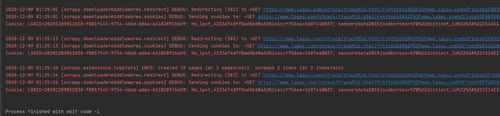
https://img1.sycdn.imooc.com//szimg/5fcfb84408c3877416000370.jpg

正在回答 回答被采纳积分+3

2回答

提问者 潇歌 2020-12-12 01:10:06
import os

BOT_NAME = 'ArticleSpider'

SPIDER_MODULES = ['ArticleSpider.spiders']
NEWSPIDER_MODULE = 'ArticleSpider.spiders'


# Crawl responsibly by identifying yourself (and your website) on the user-agent
#USER_AGENT = 'ArticleSpider (+http://www.yourdomain.com)'

# Obey robots.txt rules
ROBOTSTXT_OBEY = False

# Configure maximum concurrent requests performed by Scrapy (default: 16)
#CONCURRENT_REQUESTS = 32

# Configure a delay for requests for the same website (default: 0)
# See https://docs.scrapy.org/en/latest/topics/settings.html#download-delay
# See also autothrottle settings and docs
DOWNLOAD_DELAY = 10
# The download delay setting will honor only one of:
#CONCURRENT_REQUESTS_PER_DOMAIN = 16
#CONCURRENT_REQUESTS_PER_IP = 16

USER_AGENT = "Mozilla/5.0 (Windows NT 10.0; Win64; x64) AppleWebKit/537.36 (KHTML, like Gecko) Chrome/86.0.4240.183 Safari/537.36"

# Disable cookies (enabled by default)
COOKIES_ENABLED = True
COOKIES_DEBUG = True

# Disable Telnet Console (enabled by default)
#TELNETCONSOLE_ENABLED = False

# Override the default request headers:
#DEFAULT_REQUEST_HEADERS = {
#   'Accept': 'text/html,application/xhtml+xml,application/xml;q=0.9,*/*;q=0.8',
#   'Accept-Language': 'en',
#}

# Enable or disable spider middlewares
# See https://docs.scrapy.org/en/latest/topics/spider-middleware.html
#SPIDER_MIDDLEWARES = {
#    'ArticleSpider.middlewares.ArticlespiderSpiderMiddleware': 543,
#}

# Enable or disable downloader middlewares
# See https://docs.scrapy.org/en/latest/topics/downloader-middleware.html
DOWNLOADER_MIDDLEWARES = {
   # 'ArticleSpider.middlewares.ArticlespiderDownloaderMiddleware': 543,
   'scrapy.downloadermiddlewares.useragent.UserAgentMiddleware': 2,
}

# Enable or disable extensions
# See https://docs.scrapy.org/en/latest/topics/extensions.html
#EXTENSIONS = {
#    'scrapy.extensions.telnet.TelnetConsole': None,
#}

# Configure item pipelines
# See https://docs.scrapy.org/en/latest/topics/item-pipeline.html
ITEM_PIPELINES = {
   # 'ArticleSpider.pipelines.ArticleImagePipeline': 1,
   # 'ArticleSpider.pipelines.JsonWithEncodingPipeline': 2,
   # 'ArticleSpider.pipelines.JsonExporterPipeline': 3,
   # 'ArticleSpider.pipelines.MysqlPieline': 4,
   'ArticleSpider.pipelines.MysqlTwistedPipeline': 5,
   'ArticleSpider.pipelines.ArticlespiderPipeline': 300

}
# Enable and configure the AutoThrottle extension (disabled by default)
# See https://docs.scrapy.org/en/latest/topics/autothrottle.html
AUTOTHROTTLE_ENABLED = True
# The initial download delay
AUTOTHROTTLE_START_DELAY = 10
# The maximum download delay to be set in case of high latencies
# AUTOTHROTTLE_MAX_DELAY = 60
# The average number of requests Scrapy should be sending in parallel to
# each remote server
#AUTOTHROTTLE_TARGET_CONCURRENCY = 1.0
# Enable showing throttling stats for every response received:
#AUTOTHROTTLE_DEBUG = False

# Enable and configure HTTP caching (disabled by default)
# See https://docs.scrapy.org/en/latest/topics/downloader-middleware.html#httpcache-middleware-settings
#HTTPCACHE_ENABLED = True
#HTTPCACHE_EXPIRATION_SECS = 0
#HTTPCACHE_DIR = 'httpcache'
#HTTPCACHE_IGNORE_HTTP_CODES = []
#HTTPCACHE_STORAGE = 'scrapy.extensions.httpcache.FilesystemCacheStorage'

IMAGES_URLS_FIELD = "front_image_url"
project_dir = os.path.dirname(os.path.abspath(__file__))
print(project_dir)
IMAGES_STORE = os.path.join(project_dir, 'images')

MYSQL_HOST = "127.0.0.1"
MYSQL_DBNAME = "article_spider"
MYSQL_USER = "root"
MYSQL_PASSWORD = "root"

SQL_DATETIME_FORMAT = "%Y-%m-%d %H:%M:%S"
SQL_DATE_FORMAT = "%Y-%m-%d"


0 回复 有任何疑惑可以回复我~
bobby 2020-12-11 10:21:10
  1. 如果add_css能获取到,那么只要你的xpath正确就一定能获取到,因为css也是在内部转换为xpath的

  2. 拉钩的爬虫你有没有设置user-agent?

  3. AUTOTHROTTLE_ENABLED = True这个也得设置到settings中,这是自动限速

0 回复 有任何疑惑可以回复我~
  • 提问者 潇歌 #1
    我的配置信息上传了,老师看下
    回复 有任何疑惑可以回复我~ 2020-12-12 01:07:10
  • 提问者 潇歌 #2
    拉钩的爬虫你有没有设置user-agent?  老师说的是在setting里面设置吗还是在lagou.py文件里面,我看老师的工程里有三个logou.py,其中有一个里面设置了header,里面写着浏览器 request header里面的信息,我那边应该参考哪一个
    回复 有任何疑惑可以回复我~ 2020-12-12 01:21:43
  • bobby 回复 提问者 潇歌 #3
    你留下qq我加你看看
    回复 有任何疑惑可以回复我~ 2020-12-13 09:53:27
问题已解决,确定采纳
还有疑问,暂不采纳
微信客服

购课补贴
联系客服咨询优惠详情

帮助反馈 APP下载

慕课网APP
您的移动学习伙伴

公众号

扫描二维码
关注慕课网微信公众号