请稍等 ...
×

采纳答案成功!

向帮助你的同学说点啥吧!感谢那些助人为乐的人

出现Data没有定义

loadData () {
		this.setState({
			isLoading:true
		})
		let url = this.getUrl('?since=daily',this.props.tabLabel);
		this.dataTool.fetchNetworking(url)
					 .then(result => {
					 	this.setState({
					 		dataSource:this.state.dataSource.cloneWithRows(result),
					 		isLoading: false,
					 	})
					 })
					 .catch(error => {
					 	this.setState({
					 		result:JSON.stringify(error),
					 		isLoading: false,
					 	})
					 })
	}

	getUrl(timeRange, keyword){
		return BASE_URL + keyword + timeRange;
	}

	renderRow (data) {
		return <TrendingCell onSelect={(data) => this.onSelect(data)} data={data} />
	}
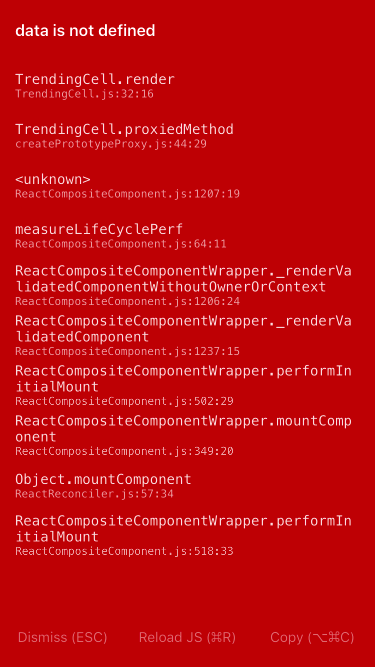
https://img1.sycdn.imooc.com/szimg//5917c53200016e8903750667.jpg

正在回答 回答被采纳积分+3

2回答

CrazyCodeBoy 2017-05-14 12:04:31

看一下为ListView设置的renderRow的属性是否正确呢?,可参考:

render() {
    return <View style={styles.container}>
        <ListView
            dataSource={this.state.dataSource}
            renderRow={(data)=>this.renderRow(data)}
            refreshControl={
                <RefreshControl
                    title='Loading...'
                    titleColor={this.props.theme.themeColor}
                    colors={[this.props.theme.themeColor]}
                    refreshing={this.state.isLoading}
                    onRefresh={()=>this.loadData()}
                    tintColor={this.props.theme.themeColor}
                />
            }
        />
    </View>
}


0 回复 有任何疑惑可以回复我~
  • 提问者 qiankunli #1
    谢谢老师,我已经找到问题了,看看我的图片!
    回复 有任何疑惑可以回复我~ 2017-05-14 13:26:50
  • 老师,你课程录的视频我们一路照做过来data是没有的 做到这里的时候你视频中的data是this.props.data
    回复 有任何疑惑可以回复我~ 2017-08-09 22:56:05
提问者 qiankunli 2017-05-14 13:27:36

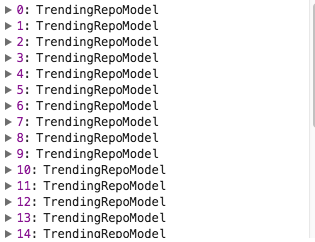
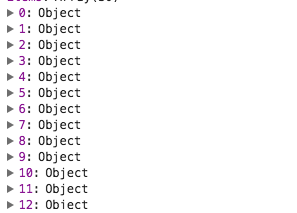
https://img1.sycdn.imooc.com/szimg//5917eadb0001b84e03150242.jpg

https://img1.sycdn.imooc.com/szimg//5917eadb00018b8402970213.jpg

Popular页面是object 而Trending页面返回的是一个Model!

0 回复 有任何疑惑可以回复我~
  • 课程录的视频有跳过,做到这里视频中的data是this.props.data,你可以看视频右边的源码参考
    回复 有任何疑惑可以回复我~ 2017-08-09 22:57:13
问题已解决,确定采纳
还有疑问,暂不采纳
微信客服

购课补贴
联系客服咨询优惠详情

帮助反馈 APP下载

慕课网APP
您的移动学习伙伴

公众号

扫描二维码
关注慕课网微信公众号