请稍等 ...
×

采纳答案成功!

向帮助你的同学说点啥吧!感谢那些助人为乐的人

只能按照对一个域名进行代理

https://img1.sycdn.imooc.com//szimg/5acd605d000198c116441176.jpg

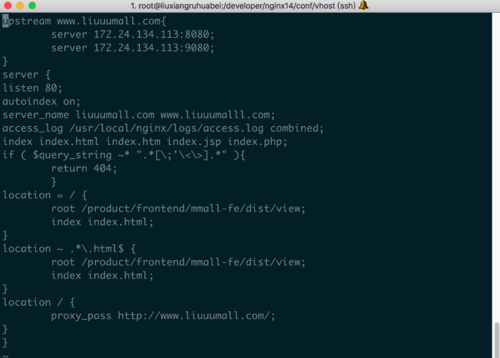
servername那一行 liuuumall在前边 name我在浏览器输入liuuumall.com可以访问主页,但是后边那个就会跳到nginx而不是主页,这个是可以直接访问试试是不是这样。 上边那个upstream是阿里内网ip。

各位同学和geely老师帮忙看下呗,这在网上搜也不知道该怎么搜 :(

正在回答 回答被采纳积分+3

3回答

提问者 小刘呀 2018-05-03 17:43:36
user  root;
worker_processes  1;

#error_log  logs/error.log;
#error_log  logs/error.log  notice;
#error_log  logs/error.log  info;

#pid        logs/nginx.pid;


events {
    worker_connections  1024;
}


http {
    include       mime.types;
    default_type  application/octet-stream;

    #log_format  main  '$remote_addr - $remote_user [$time_local] "$request" '
    #                  '$status $body_bytes_sent "$http_referer" '
    #                  '"$http_user_agent" "$http_x_forwarded_for"';

    #access_log  logs/access.log  main;

    sendfile        on;
    #tcp_nopush     on;

    #keepalive_timeout  0;
    keepalive_timeout  65;

    #gzip  on;

    server {
        listen       80;
        server_name  localhost;

        #charset koi8-r;

        #access_log  logs/host.access.log  main;

        location / {
            root   html;
            index  index.html index.htm;
        }

        #error_page  404              /404.html;

        # redirect server error pages to the static page /50x.html
        #
        error_page   500 502 503 504  /50x.html;
        location = /50x.html {
            root   html;
        }

        # proxy the PHP scripts to Apache listening on 127.0.0.1:80
        #
        #location ~ \.php$ {
        #    proxy_pass   http://127.0.0.1;
        #}

        # pass the PHP scripts to FastCGI server listening on 127.0.0.1:9000
        #
        #location ~ \.php$ {
        #    root           html;
        #    fastcgi_pass   127.0.0.1:9000;
        #    fastcgi_index  index.php;
        #    fastcgi_param  SCRIPT_FILENAME  /scripts$fastcgi_script_name;
        #    include        fastcgi_params;
        #}

        # deny access to .htaccess files, if Apache's document root
        # concurs with nginx's one
        #
        #location ~ /\.ht {
        #    deny  all;
        #}
    }
include vhost/*.conf;

    # another virtual host using mix of IP-, name-, and port-based configuration
    #
    #server {
    #    listen       8000;
    #    listen       somename:8080;
    #    server_name  somename  alias  another.alias;

    #    location / {
    #        root   html;
    #        index  index.html index.htm;
    #    }
    #}


    # HTTPS server
    #
    #server {
    #    listen       443;
    #    server_name  localhost;

    #    ssl                  on;
    #    ssl_certificate      cert.pem;
    #    ssl_certificate_key  cert.key;

    #    ssl_session_timeout  5m;

    #    ssl_protocols  SSLv2 SSLv3 TLSv1;
    #    ssl_ciphers  HIGH:!aNULL:!MD5;
    #    ssl_prefer_server_ciphers   on;

    #    location / {
    #        root   html;
    #        index  index.html index.htm;
    #    }
    #}

}

1 nginx.conf

server {
listen 80;
autoindex on;
server_name admin.liuuumall.com;
access_log /usr/local/nginx/logs/access.log combined;
index index.html index.htm index.jsp index.php;
#root /devsoft/apache-tomcat-7.0.73/webapps/mmall;
#error_page 404 /404.html;
if ( $query_string ~* ".*[\;'\<\>].*" ){
        return 404;
        }
location = / {
        root /product/frontend/admin-fe/dist/view;
        index index.html;
}
location ~ .*\.(html|htm)$ {
        root /product/frontend/admin-fe/dist/view;
        index index.html;
        }
location / {
        proxy_pass http://www.liuuumall.com/;
        #add_header Access-Control-Allow-Origin '*';
        }
}

2 admin.liuuumall.com.conf

server {
    listen 80;
    autoindex off;
    server_name img.liuuumall.com;
    access_log /usr/local/nginx/logs/access.log combined;
    index index.html index.htm index.jsp index.php;
    #error_page 404 /404.html;
    if ( $query_string ~* ".*[\;'\<\>].*" ){
        return 404;
    }

    location ~ /(mmall-fe|admin-fe)/dist/view/* {
        deny all;
    }

    location / {
        root /product/ftpfile/img/;
        add_header Access-Control-Allow-Origin *;
    }
}

3 img.liuuumall.com.conf

upstream www.liuuumall.com{
	server 172.24.134.113:8080;
	server 172.24.134.113:9080;
}
server {
listen 80;
autoindex on;
server_name liuuumall.com www.liuuumalll.com;
access_log /usr/local/nginx/logs/access.log combined;
index index.html index.htm index.jsp index.php;
if ( $query_string ~* ".*[\;'\<\>].*" ){
        return 404;
        }
location = / {
	root /product/frontend/mmall-fe/dist/view;
	index index.html;
}
location ~ .*\.html$ {
	root /product/frontend/mmall-fe/dist/view;
	index index.html;
}
location / {
        proxy_pass http://www.liuuumall.com/;
}
}

4 liuuumall.com.conf

server {
    listen 80;
    autoindex off;
    server_name s.liuuumall.com;
    access_log /usr/local/nginx/logs/access.log combined;
    index index.html index.htm index.jsp index.php;
    if ( $query_string ~* ".*[\;'\<\>].*" ){
        return 404;
    }

    location ~ /(mmall-fe|admin-fe)/dist/view/* {
        deny all;
    }

    location / {
        root /product/frontend/;
	expires 7d;
	add_header Access-Control-Allow-Origin *;
    }
}

5 s.liuuumall.com.conf


0 回复 有任何疑惑可以回复我~
Geely 2018-04-19 23:39:46

你好,你说的后边的那个是说带www的么? 这个和ng版本无关,应该还是你的配置有问题,但是从配置文件看不出来问题~~upstream也是两个tomcat的。。。另外你有具体你情况的截图没,都发上来看看,最近家里比较忙刚看到。。

0 回复 有任何疑惑可以回复我~
  • 提问者 小刘呀 #1
    上边是所有nginx的配置 共5个
    回复 有任何疑惑可以回复我~ 2018-05-03 17:44:12
  • 提问者 小刘呀 #2
    麻烦老师有空看下吧
    回复 有任何疑惑可以回复我~ 2018-05-03 17:44:33
  • Geely 回复 提问者 小刘呀 #3
    upstream www.liuuumall.com{
        server 172.24.134.113:8080;
        server 172.24.134.113:9080;
    }
    这个可以再增加一个没有www的~~看你的问题
    回复 有任何疑惑可以回复我~ 2018-05-07 00:19:44
polo哦 2018-04-11 09:59:11

你这个是阿里云服务器的nginx吗?要做一个域名解析才能访问

如果是虚拟机,就需要在本地的host文件配一下ip地址-域名

0 回复 有任何疑惑可以回复我~
  • 提问者 小刘呀 #1
    是阿里的nginx,域名都配过了,admin img @ 和 www 都是 A 都可以访问转发,可是还不行,难道是nginx版本不对的坑?
    回复 有任何疑惑可以回复我~ 2018-04-11 10:03:28
问题已解决,确定采纳
还有疑问,暂不采纳
微信客服

购课补贴
联系客服咨询优惠详情

帮助反馈 APP下载

慕课网APP
您的移动学习伙伴

公众号

扫描二维码
关注慕课网微信公众号