这一节的login表单中点击提交提示CSRF验证失败
1.环境:
win10,django 2.1.2,Mako 1.1.0
2.问题现象:
9-4小节一分零三秒之前的dashboard 的代码功能实现都正常。
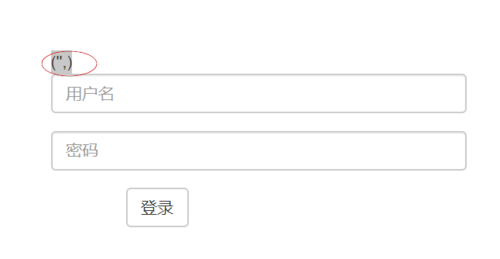
login 页面 get 方法显示正常,测试填写用户名和密码后,点击提交出现报错页面:

3.错误代码:
(1)app\dashboard\views\auth.py:
from django.shortcuts import redirect
from django.views.generic import View
from app.libs.base_render import render_to_response

class Login(View):
    TEMPLATE = 'dashboard/auth/login.html'

    def get(self, request):
        return render_to_response(request, self.TEMPLATE)

    def post(self, request):
        username = request.POST.get('username')
        password = request.POST.get('password')
        print(username, password)
        return redirect('/dashboard/login')
(2)templates\dashboard\auth\login.html
<!DOCTYPE html>
<html lang="en">
<head>
    <meta charset="UTF-8">
    <title>Login | 登录</title>
    <link href="/static/dashboard/css/bootstrap.min.css" rel="stylesheet" />
    <link rel="stylesheet" href="/static/dashboard/css/login.css">
</head>
<body>
<form class="form-horizontal edit-area" action="login" method="POST">
  <div class="form-group">
  <div class="col-sm-10">
    <input type="text" name="username" class="form-control" placeholder="用户名">
  </div>
  </div>
  <div class="form-group">
  <div class="col-sm-10">
    <input type="password" name="password" class="form-control" placeholder="密码">
  </div>
  </div>
  <div class="form-group">
      <div class="col-sm-offset-2 colsm-10">
          <button type="submit" class="btn btn-default">登录</button>
      </div>
  </div>
</form>
</body>
</html>
(3)app\libs\base_renderr.py
from mako.lookup import TemplateLookup
from django.template import RequestContext
from django.conf import settings
from django.template.context import Context
from django.http import HttpResponse


def render_to_response(request, template, data=None):
    """与jinjia2不同,mako的模板需要自己定义,于是有了本页的代码"""
    context_instance = RequestContext(request)
    path = settings.TEMPLATES[0]['DIRS'][0]

    lookup = TemplateLookup(
        directories=[path],
        output_encoding='utf-8',
        input_encoding='utf-8',
    )

    mako_template = lookup.get_template(template)

    if not data:
        data = {}

    if context_instance:
        context_instance.update(data)
    else:
        context_instance = Context(data)

    result = {}

    for d in context_instance:
        result.update(d)

    result['csrf_token'] = (
        '<input type="hidden" '
        'name="csrfmiddlewaretoken" '
        'value="{0}" />'.format(
            request.META.get('CSRF_COOKIE', '')),)

return HttpResponse(mako_template.render(**result))2078
收起
正在回答
4回答




相似问题








登录后可查看更多问答,登录/注册