cnpm install -g appium出错,上一步用npm install -g cnpm --registry=https...有警告

C:\Users\小鹿丫>cnpm install -g appium
Downloading appium to C:\Users\小鹿丫\AppData\Roaming\npm\node_modules\appium_tmp
Copying C:\Users\小鹿丫\AppData\Roaming\npm\node_modules\appium_tmp_appium@1.9.0@appium to C:\Users\小鹿丫\AppData\Roaming\npm\node_modules\appium
Installing appium’s dependencies to C:\Users\小鹿丫\AppData\Roaming\npm\node_modules\appium/node_modules
[1/32] appium-fake-driver@^0.x installed at node_modules_appium-fake-driver@0.5.0@appium-fake-driver
[2/32] appium-base-driver@3.x installed at node_modules_appium-base-driver@3.6.3@appium-base-driver
[3/32] appium-windows-driver@1.x installed at node_modules_appium-windows-driver@1.3.0@appium-windows-driver
[4/32] appium-mac-driver@1.x installed at node_modules_appium-mac-driver@1.2.0@appium-mac-driver
[5/32] appium-tizen-driver@1.1.1-beta installed at node_modules_appium-tizen-driver@1.1.1-beta@appium-tizen-driver
[6/32] async-lock@^1.0.0 existed at node_modules_async-lock@1.1.3@async-lock
[7/32] asyncbox@2.x existed at node_modules_asyncbox@2.5.0@asyncbox
[8/32] babel-runtime@=5.8.24 existed at node_modules_babel-runtime@5.8.24@babel-runtime
[9/32] bluebird@3.x existed at node_modules_bluebird@3.5.2@bluebird
[10/32] continuation-local-storage@3.x existed at node_modules_continuation-local-storage@3.2.1@continuation-local-storage
[11/32] appium-xcuitest-driver@2.x installed at node_modules_appium-xcuitest-driver@2.94.2@appium-xcuitest-driver
[12/32] dateformat@^3.0.3 installed at node_modules_dateformat@3.0.3@dateformat
[13/32] lodash@^4.17.9 existed at node_modules_lodash@4.17.11@lodash
[14/32] find-root@^1.1.0 installed at node_modules_find-root@1.1.0@find-root
[15/32] npmlog@4.x existed at node_modules_npmlog@4.1.2@npmlog
[16/32] request@^2.81.0 existed at node_modules_request@2.88.0@request
[17/32] request-promise@4.x existed at node_modules_request-promise@4.2.2@request-promise
[18/32] semver@^5.5.0 existed at node_modules_semver@5.5.1@semver
[19/32] source-map-support@0.x existed at node_modules_source-map-support@0.5.9@source-map-support
[20/32] argparse@^1.0.10 installed at node_modules_argparse@1.0.10@argparse
[21/32] teen_process@1.x existed at node_modules_teen_process@1.13.1@teen_process
[22/32] longjohn@^0.2.12 installed at node_modules_longjohn@0.2.12@longjohn
heapdump@0.x found binding.gyp file, auto run “node-gyp rebuild”
C:\Users\小鹿丫\AppData\Roaming\npm\node_modules\appium\node_modules_heapdump@0.3.9@heapdump>node “C:\Users\小鹿丫\AppData\Roaming\npm\node_modules\cnpm\node_modules\npminstall\node-gyp-bin\node-gyp.js” rebuild
[23/32] winston@2.x installed at node_modules_winston@2.4.4@winston
[24/32] appium-ios-driver@2.x installed at node_modules_appium-ios-driver@2.9.0@appium-ios-driver
[25/32] appium-support@2.x installed at node_modules_appium-support@2.20.0@appium-support
Traceback (most recent call last):
File “C:\Users\小鹿丫\AppData\Roaming\npm\node_modules\cnpm\node_modules\node-gyp\gyp\gyp_main.py”, line 16, in
sys.exit(gyp.script_main())
File “C:\Users\小鹿丫\AppData\Roaming\npm\node_modules\cnpm\node_modules\node-gyp\gyp\pylib\gyp_init_.py”, line 545, in script_main
return main(sys.argv[1:])
File “C:\Users\小鹿丫\AppData\Roaming\npm\node_modules\cnpm\node_modules\node-gyp\gyp\pylib\gyp_init_.py”, line 538, in main
return gyp_main(args)
File “C:\Users\小鹿丫\AppData\Roaming\npm\node_modules\cnpm\node_modules\node-gyp\gyp\pylib\gyp_init_.py”, line 523, in gyp_main
generator.GenerateOutput(flat_list, targets, data, params)
File “C:\Users\小鹿丫\AppData\Roaming\npm\node_modules\cnpm\node_modules\node-gyp\gyp\pylib\gyp\generator\msvs.py”, line 2004, in GenerateOutput
generator_flags))
File “C:\Users\小鹿丫\AppData\Roaming\npm\node_modules\cnpm\node_modules\node-gyp\gyp\pylib\gyp\generator\msvs.py”, line 943, in _GenerateProject
return _GenerateMSVSProject(project, options, version, generator_flags)
File “C:\Users\小鹿丫\AppData\Roaming\npm\node_modules\cnpm\node_modules\node-gyp\gyp\pylib\gyp\generator\msvs.py”, line 1047, in _GenerateMSVSProject
p.WriteIfChanged()
File “C:\Users\小鹿丫\AppData\Roaming\npm\node_modules\cnpm\node_modules\node-gyp\gyp\pylib\gyp\MSVSProject.py”, line 208, in WriteIfChanged
encoding=“Windows-1252”)
File “C:\Users\小鹿丫\AppData\Roaming\npm\node_modules\cnpm\node_modules\node-gyp\gyp\pylib\gyp\easy_xml.py”, line 122, in WriteXmlIfChanged
xml_string = xml_string.decode(default_encoding).encode(encoding)
File “C:\Program Files\Java\Python27\lib\encodings\cp1252.py”, line 12, in encode
return codecs.charmap_encode(input,errors,encoding_table)
UnicodeEncodeError: ‘charmap’ codec can’t encode characters in position 505-507: character maps to
**gyp ERR! configure error
gyp ERR! stack Error: gyp failed with exit code: 1
gyp ERR! stack at ChildProcess.onCpExit (C:\Users\小鹿丫\AppData\Roaming\npm\node_modules\cnpm\node_modules\node-gyp\lib\configure.js:345:16)
gyp ERR! stack at emitTwo (events.js:126:13)
gyp ERR! stack at ChildProcess.emit (events.js:214:7)
gyp ERR! stack at Process.ChildProcess._handle.onexit (internal/child_process.js:198:12)
gyp ERR! System Windows_NT 10.0.15063
gyp ERR! command “C:\Program Files\Java\nodejs\node.exe” “C:\Users\小鹿丫\AppData\Roaming\npm\node_modules\cnpm\node_modules\npminstall\node-gyp-bin\node-gyp.js” "rebuild"
gyp ERR! cwd C:\Users\小鹿丫\AppData\Roaming\npm\node_modules\appium\node_modules_heapdump@0.3.9@heapdump
gyp ERR! node -v v8.12.0
gyp ERR! node-gyp -v v3.8.0
gyp ERR! not ok
[heapdump@0.x] optional install error: Error: Run "C:\Windows\system32\cmd.exe /d /s /c node-gyp rebuild" error, exit code 1
at ChildProcess.proc.on.code (C:\Users\小鹿丫\AppData\Roaming\npm\node_modules\cnpm\node_modules\runscript\index.js:74:21)
at emitTwo (events.js:126:13)
at ChildProcess.emit (events.js:214:7)
at maybeClose (internal/child_process.js:915:16)
at Process.ChildProcess._handle.onexit (internal/child_process.js:209:5)
fsevents@1.2.4 download from binary mirror: {“module_name”:“fse”,“module_path”:"./lib/binding/{configuration}/{node_abi}-{platform}-{arch}/",“remote_path”:"./v{version}/",“package_name”:"{module_name}-v{version}-{node_abi}-{platform}-{arch}.tar.gz",“host”:“https://cdn.npm.taobao.org/dist/fsevents”}
platform unsupported fsevents@1.x Package require os(darwin) not compatible with your platform(win32)
[fsevents@1.x] optional install error: Package require os(darwin) not compatible with your platform(win32)
[28/32] appium-uiautomator2-driver@1.x installed at node_modules_appium-uiautomator2-driver@1.19.0@appium-uiautomator2-driver
[29/32] appium-espresso-driver@>=1.0.0-beta.13 installed at node_modules_appium-espresso-driver@1.0.0-beta.16@appium-espresso-driver
[30/32] appium-android-driver@3.x installed at node_modules_appium-android-driver@3.7.0@appium-android-driver
[31/32] appium-selendroid-driver@1.x installed at node_modules_appium-selendroid-driver@1.12.0@appium-selendroid-driver[32/32] appium-youiengine-driver@1.x installed at node_modules_appium-youiengine-driver@1.0.20@appium-youiengine-driverexecute post install 3 scripts…
[1/3] scripts.install appium-windows-driver@1.x run "node install-npm.js"
info WinAppDriver You must use WinAppDriver version 1.1-RC
info WinAppDriver Verifying WinAppDriver version 1.1-RC is installed via comparing the checksum.
info WinAppDriver WinAppDriver.exe doesn’t exist at the correct version 1.1-RC, setting up
WARNING: You are not running as an administrator so WinAppDriver cannot be installed for you; please reinstall as admin
WinAppDriver was not installed; please check your system and re-run npm install if you need WinAppDriver
[1/3] scripts.install appium-windows-driver@1.x finished in 963ms
[2/3] scripts.install appium-selendroid-driver@1.12.0 › appium-android-driver@4.1.1 › appium-chromedriver@^4.0.0 run “node install-npm.js”
[21:18:33] [Chromedriver Install] Installing Chromedriver version ‘2.42’ for platform ‘win’ and architecture ‘32’
[21:18:33] [Chromedriver Install] Opening temp file to write ‘chromedriver_win32’ to…
[21:18:33] [Chromedriver Install] Opened temp file ‘C:\Users\小鹿丫\AppData\Local\Temp\2018820-2980-xnrrwq.8l9za\chromedriver_win32.zip’
[21:18:33] [Chromedriver Install] Downloading https://cdn.npm.taobao.org/dist/chromedriver/2.42/chromedriver_win32.zip…
[21:18:36] [Chromedriver Install] Writing binary content to C:\Users\小鹿丫\AppData\Local\Temp\2018820-2980-xnrrwq.8l9za\chromedriver_win32.zip…
[21:18:36] [Chromedriver Install] Extracting C:\Users\小鹿丫\AppData\Local\Temp\2018820-2980-xnrrwq.8l9za\chromedriver_win32.zip to C:\Users\小鹿丫\AppData\Local\Temp\2018820-2980-xnrrwq.8l9za\chromedriver_win32
[21:18:36] [Chromedriver Install] Creating C:\Users\小鹿丫\AppData\Roaming\npm\node_modules\appium\node_modules_appium-chromedriver@4.5.0@appium-chromedriver\chromedriver\win…
[21:18:36] [Chromedriver Install] Copying unzipped binary, reading from C:\Users\小鹿丫\AppData\Local\Temp\2018820-2980-xnrrwq.8l9za\chromedriver_win32\chromedriver.exe…
[21:18:36] [Chromedriver Install] Writing to C:\Users\小鹿丫\AppData\Roaming\npm\node_modules\appium\node_modules_appium-chromedriver@4.5.0@appium-chromedriver\chromedriver\win\chromedriver.exe…
[21:18:36] [Chromedriver Install] C:\Users\小鹿丫\AppData\Roaming\npm\node_modules\appium\node_modules_appium-chromedriver@4.5.0@appium-chromedriver\chromedriver\win\chromedriver.exe successfully put in place
[2/3] scripts.install appium-selendroid-driver@1.12.0 › appium-android-driver@4.1.1 › appium-chromedriver@^4.0.0 finished in 5s
[3/3] scripts.install appium-selendroid-driver@1.x run "node ./bin/install.js"
found:38] Java version 1.8.0_20
[21:18:38] Could not find Java’s ‘jar’ executable on your PATH. Please ensure it is present and try running install again
[3/3] scripts.install appium-selendroid-driver@1.x finished in 2s
Recently updated (since 2018-09-13): 14 packages (detail see file C:\Users\小鹿丫\AppData\Roaming\npm\node_modules\appium\node_modules.recently_updates.txt)
Today:
→ appium-selendroid-driver@1.12.0 › appium-android-driver@^4.0.0(4.1.1) (07:11:35)
→ appium-mac-driver@1.2.0 › appium-base-driver@2.33.0 › morgan@1.9.1 › basic-auth@~2.0.0(2.0.1) (11:26:02)
→ appium-ios-driver@2.9.0 › node-simctl@^3.11.5(3.15.0) (07:09:48)
→ appium-espresso-driver@>=1.0.0-beta.13(1.0.0-beta.16) (01:07:08)
→ appium-xcuitest-driver@2.x(2.94.2) (07:36:18)
2018-09-19
→ appium-uiautomator2-driver@1.19.0 › request@2.88.0 › combined-stream@~1.0.6(1.0.7) (00:32:24)
2018-09-18
→ appium-ios-driver@2.9.0 › appium-ios-simulator@^3.0.0(3.4.0) (04:15:20)
2018-09-17
→ appium-uiautomator2-driver@1.x(1.19.0) (23:28:32)
→ appium-selendroid-driver@1.12.0 › appium-android-driver@4.1.1 › appium-chromedriver@^4.0.0(4.5.0) (23:05:53)
→ appium-windows-driver@1.x(1.3.0) (23:09:12)
→ appium-uiautomator2-driver@1.19.0 › appium-uiautomator2-server@^1.9.2(1.18.0) (23:22:39)
2018-09-15
→ appium-ios-driver@2.9.0 › pem@^1.8.3(1.13.1) (05:05:25)
2018-09-14
→ appium-ios-driver@2.x(2.9.0) (05:56:50)
→ appium-selendroid-driver@1.12.0 › appium-adb@^6.2.1(6.19.0) (05:34:48)
All packages installed (496 packages installed from npm registry, used 47s(network 39s), speed 1.14MB/s, json 415(4MB), tarball 40.54MB)
[appium@1.9.0] link C:\Users\小鹿丫\AppData\Roaming\npm\appium@ -> C:\Users\小鹿丫\AppData\Roaming\npm\node_modules\appium\build\lib\main.js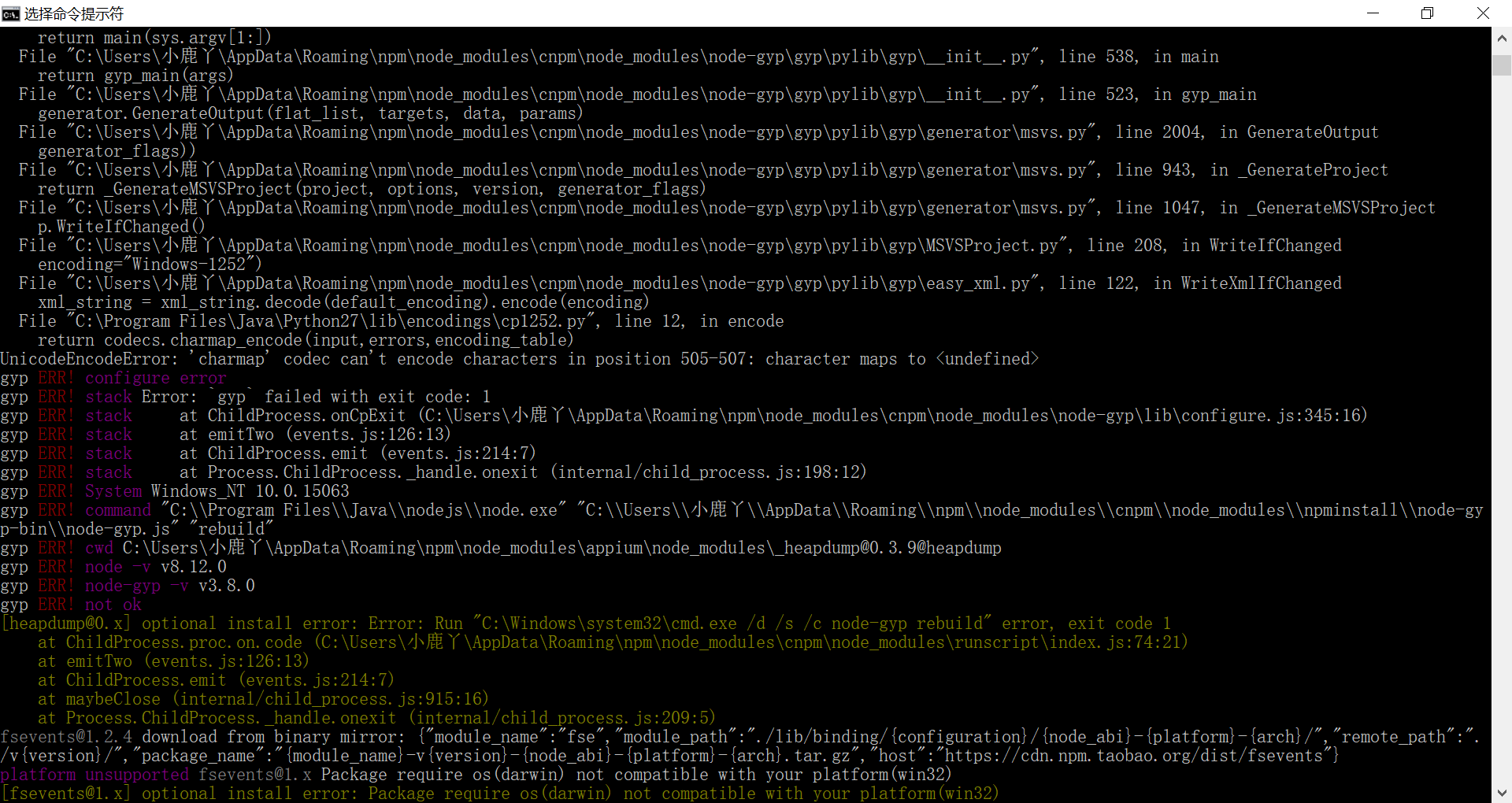

 中文,报错中已经提示解码失败。这个换成english的 哈哈