和老师的结果不一样,报allure-results does not exist
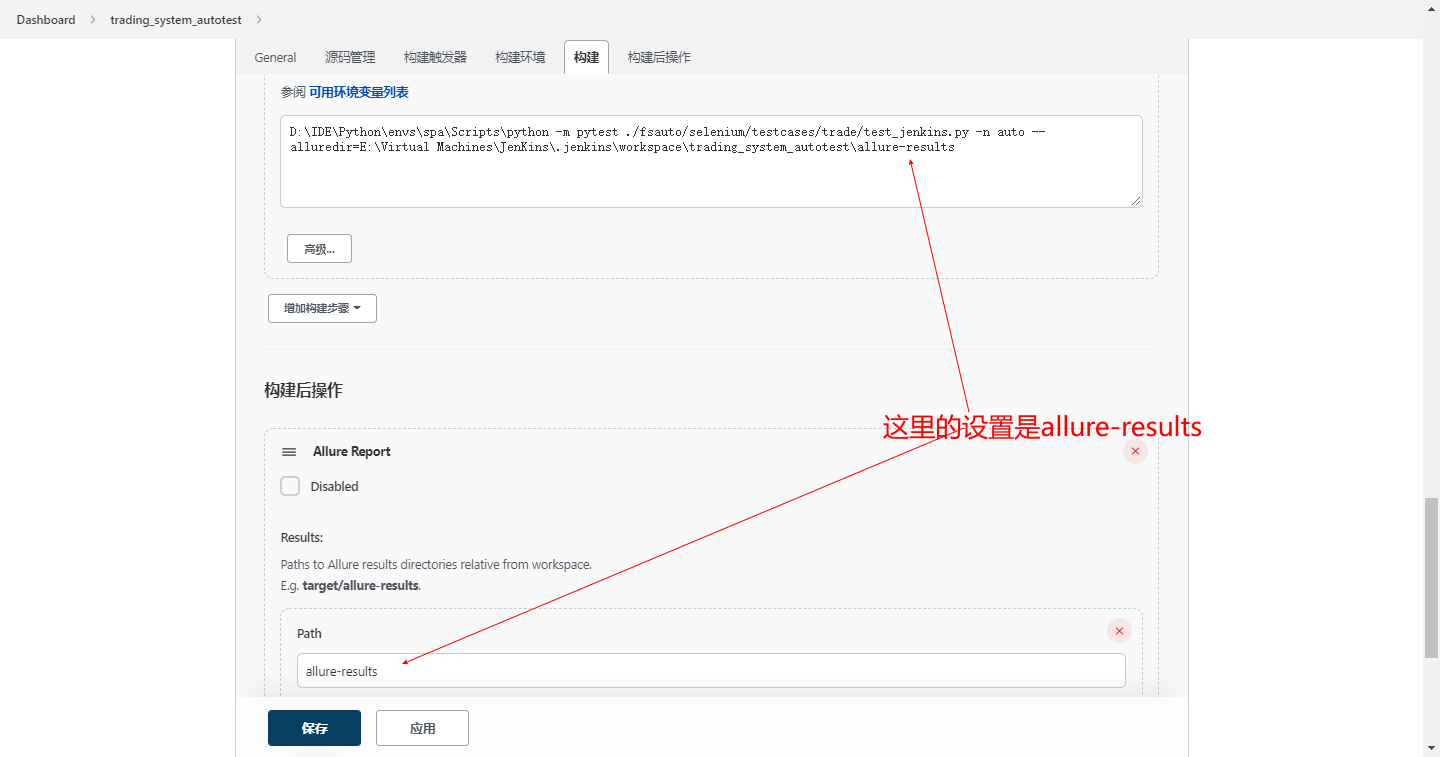
E:\Virtual Machines\JenKins\.jenkins\workspace\trading_system_autotest>D:\IDE\Python\envs\spa\Scripts\python -m pytest ./fsauto/selenium/testcases/trade/test_jenkins.py -n auto --alluredir=E:\Virtual Machines\JenKins\.jenkins\workspace\trading_system_autotest\allure-results
============================= test session starts =============================
platform win32 -- Python 3.7.6, pytest-7.1.2, pluggy-1.0.0
rootdir: E:\Virtual Machines\JenKins\.jenkins\workspace\trading_system_autotest, configfile: pytest.ini
plugins: allure-pytest-2.10.0, assume-2.4.3, forked-1.4.0, html-3.1.1, metadata-2.0.2, rerunfailures-10.2, xdist-2.5.0
gw0 I / gw1 I / gw2 I / gw3 I

[gw0] Python 3.7.6 (tags/v3.7.6:43364a7ae0, Dec 19 2019, 00:42:30) [MSC v.1916 64 bit (AMD64)]

[gw1] Python 3.7.6 (tags/v3.7.6:43364a7ae0, Dec 19 2019, 00:42:30) [MSC v.1916 64 bit (AMD64)]

[gw2] Python 3.7.6 (tags/v3.7.6:43364a7ae0, Dec 19 2019, 00:42:30) [MSC v.1916 64 bit (AMD64)]

[gw3] Python 3.7.6 (tags/v3.7.6:43364a7ae0, Dec 19 2019, 00:42:30) [MSC v.1916 64 bit (AMD64)]
gw0 [0] / gw1 [0] / gw2 [0] / gw3 [0]

scheduling tests via LoadScheduling

============================ no tests ran in 3.27s ============================

E:\Virtual Machines\JenKins\.jenkins\workspace\trading_system_autotest>exit 5
Build step 'Execute Windows batch command' marked build as failure
[trading_system_autotest] $ "E:\Virtual Machines\JenKins\.jenkins\tools\ru.yandex.qatools.allure.jenkins.tools.AllureCommandlineInstallation\Allure\bin\allure.bat" generate -c -o "E:\Virtual Machines\JenKins\.jenkins\workspace\trading_system_autotest\allure-report"
allure-results does not exist
Report successfully generated to E:\Virtual Machines\JenKins\.jenkins\workspace\trading_system_autotest\allure-report
Allure report was successfully generated.
Creating artifact for the build.
Artifact was added to the build.
Finished: FAILURE
791
收起
正在回答 回答被采纳积分+3
1回答

相似问题
does not exist or no pull access
1756
0
13

linux上运行jar包,默认从hdfs上找,怎样改从电脑文件中找
1122
0
6



使用Allure Report,如何在运行时动态更改case名字
920
0
3

登录后可查看更多问答,登录/注册