采纳答案成功!
向帮助你的同学说点啥吧!感谢那些助人为乐的人
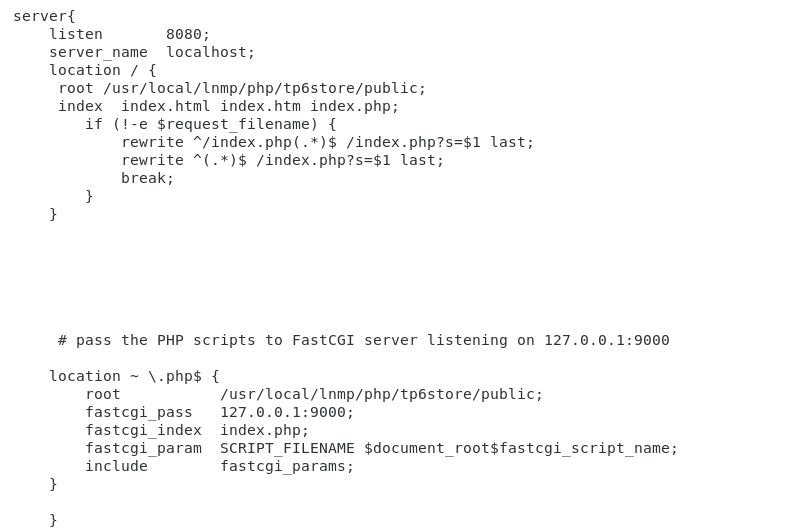
老师,我看着没毛病啊 直接输入 127.0.0.1:8080可以访问到 控制器里的index
将root和index提取到server下面试下,直接使用如下配置重启nginx试下
server { listen 8080; server_name localhost; root /usr/local/lnmp/php/tp6store/public; index index.html index.htm index.php; location / { if (!-e $request_filename) { rewrite ^(.*)$ /index.php?s=/$1 last; } } location ~ \.php(.*)$ { fastcgi_pass 127.0.0.1:9000; fastcgi_index index.php; fastcgi_param SCRIPT_FILENAME $document_root$fastcgi_script_name; include fastcgi_params; } }
还是不行,我看了日志 说是没有权限 然是我给了之后依然没用
可以把报错截图出来看下嘛,看看是nginx没权限还是代码目录没权限
2020/04/23 19:33:44 [error] 5986#5986: *1 open() "/usr/local/lnmp/php/tp6store/public/a.html" failed (13: Permission denied), client: 127.0.0.1, server: localhost, request: "GET /a.html HTTP/1.1", host: "127.0.0.1:8080"
登录后可查看更多问答,登录/注册
一课就能掌握TP6.0基础及运用,打造完整高并发的电商后端项目
2.3k 19
1.8k 19
5.2k 16
1.9k 16
1.8k 16
购课补贴联系客服咨询优惠详情
慕课网APP您的移动学习伙伴
扫描二维码关注慕课网微信公众号