采纳答案成功!
向帮助你的同学说点啥吧!感谢那些助人为乐的人
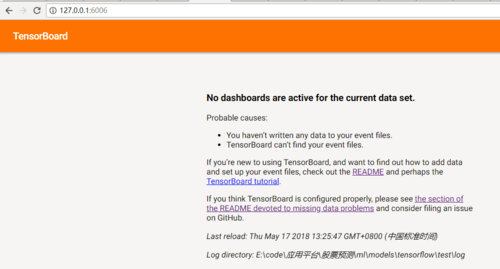
老师您好:,请问下启动tensorboard后,访问结果如下:
准备工作:log确实已经生成了,
代码贴一下吧
# -*- coding: UTF-8 -*-

# 引入tensorflow
import tensorflow as tf

# 构造图(Graph)的结构
# 用一个线性方程的例子 y = W * x + b
W = tf.Variable(2.0, dtype=tf.float32, name="Weight")  # 权重
b = tf.Variable(1.0, dtype=tf.float32, name="Bias")  # 偏差
x = tf.placeholder(dtype=tf.float32, name="Input")  # 输入
with tf.name_scope("Output"):      # 输出的命名空间
    y = W * x + b    # 输出

# const = tf.constant(2.0)  # 不需要初始化

# 定义保存日志的路径
path = "./log"

# 创建用于初始化所有变量(Variable)的操作
# 如果定义了变量,但没有初始化的操作,会报错
init = tf.global_variables_initializer()

# 创建 Session(会话)
with tf.Session() as sess:
    sess.run(init)  # 初始化变量
    writer = tf.summary.FileWriter(path, sess.graph)
    result = sess.run(y, {x: 3.0})  # 为 x 赋值 3
    print("y = W * x + b,值为 {}".format(result))  # 打印 y = W * x + b 的值,就是 7
    writer.close()
登录后可查看更多问答,登录/注册
掌握TTensorFlow模型构建与开发,快速上手机器学习
919 6
1.1k 4
1.9k 3
973 3
908 3
购课补贴联系客服咨询优惠详情
慕课网APP您的移动学习伙伴
扫描二维码关注慕课网微信公众号