执行报错: Error: Method invocation is not a constant expression.
plugin_use.dart 源代码:
import 'package:flutter/material.dart';
import 'package:flutter_color_plugin/flutter_color_plugin.dart';

// void main() {
//   runApp(const PluginUse());
// }

class PluginUse extends StatelessWidget {
  const PluginUse({Key? key}) : super(key: key);

  // This widget is the root of your application.
  @override
  Widget build(BuildContext context) {
    return MaterialApp(
      title: '如何使用 Flutter 插件',
      theme: ThemeData(
        primarySwatch: Colors.blue,
      ),
      home: const MyHomePage(title: '如何使用 Flutter 插件'),
    );
  }
}

class MyHomePage extends StatefulWidget {
  const MyHomePage({Key? key, required this.title}) : super(key: key);
  final String title;

  @override
  State<MyHomePage> createState() => _MyHomePageState();
}

class _MyHomePageState extends State<MyHomePage> {
  int _counter = 0;

  void _incrementCounter() {
    setState(() {
      _counter++;
    });
  }

  @override
  Widget build(BuildContext context) {
    return Scaffold(
      appBar: AppBar(
        title: Text(widget.title),
      ),
      body: Center(
        child: Column(mainAxisAlignment: MainAxisAlignment.center,
          children: <Widget>[
            const Text(
              'You have pushed the button this many times-1:',
              // ColorUtil.color('#a1FF5733')

              // style: TextStyle(color: ColorUtil.color('#899900')),
              style: TextStyle(color: ColorUtil.color('#a9ee00')),
            ),
            Text(
              '$_counter',
              style: Theme.of(context).textTheme.headline4,
            ),
          ],
        ),
      ),
      floatingActionButton: FloatingActionButton(
        onPressed: _incrementCounter,
        tooltip: 'Increment',
        child: const Icon(Icons.add),
      ), // This trailing comma makes auto-formatting nicer for build methods.
    );
  }
}
plugin_use.dart 源代码:
import 'package:flutter/material.dart';
import 'package:flutter_basics_mu_01/plugin_use.dart';

// void main() {
//   // runApp(const MyApp());
// runApp(PluginUse)
// }
void main() => runApp(PluginUse());


class MyApp extends StatelessWidget {
  const MyApp({Key? key}) : super(key: key);

  // This widget is the root of your application.
  @override
  Widget build(BuildContext context) {
    return MaterialApp(
      title: 'Flutter Demo',
      theme: ThemeData(
        primarySwatch: Colors.blue,
      ),
      home: const MyHomePage(title: 'Flutter Demo Home Page'),
    );
  }
}

class MyHomePage extends StatefulWidget {
  const MyHomePage({Key? key, required this.title}) : super(key: key);

  final String title;

  @override
  State<MyHomePage> createState() => _MyHomePageState();
}

class _MyHomePageState extends State<MyHomePage> {
  int _counter = 0;

  void _incrementCounter() {
    setState(() {
      _counter++;
    });
  }

  @override
  Widget build(BuildContext context) {
    return Scaffold(
      appBar: AppBar(
        title: Text(widget.title),
      ),
      body: Center(
        child: Column(
          mainAxisAlignment: MainAxisAlignment.center,
          children: <Widget>[
            const Text(
              'You have pushed the button this many times-1:',
            ),
            Text(
              '$_counter',
              style: Theme.of(context).textTheme.headline4,
            ),
          ],
        ),
      ),
      floatingActionButton: FloatingActionButton(
        onPressed: _incrementCounter,
        tooltip: 'Increment',
        child: const Icon(Icons.add),
      ), // This trailing comma makes auto-formatting nicer for build methods.
    );
  }
}
报错图例: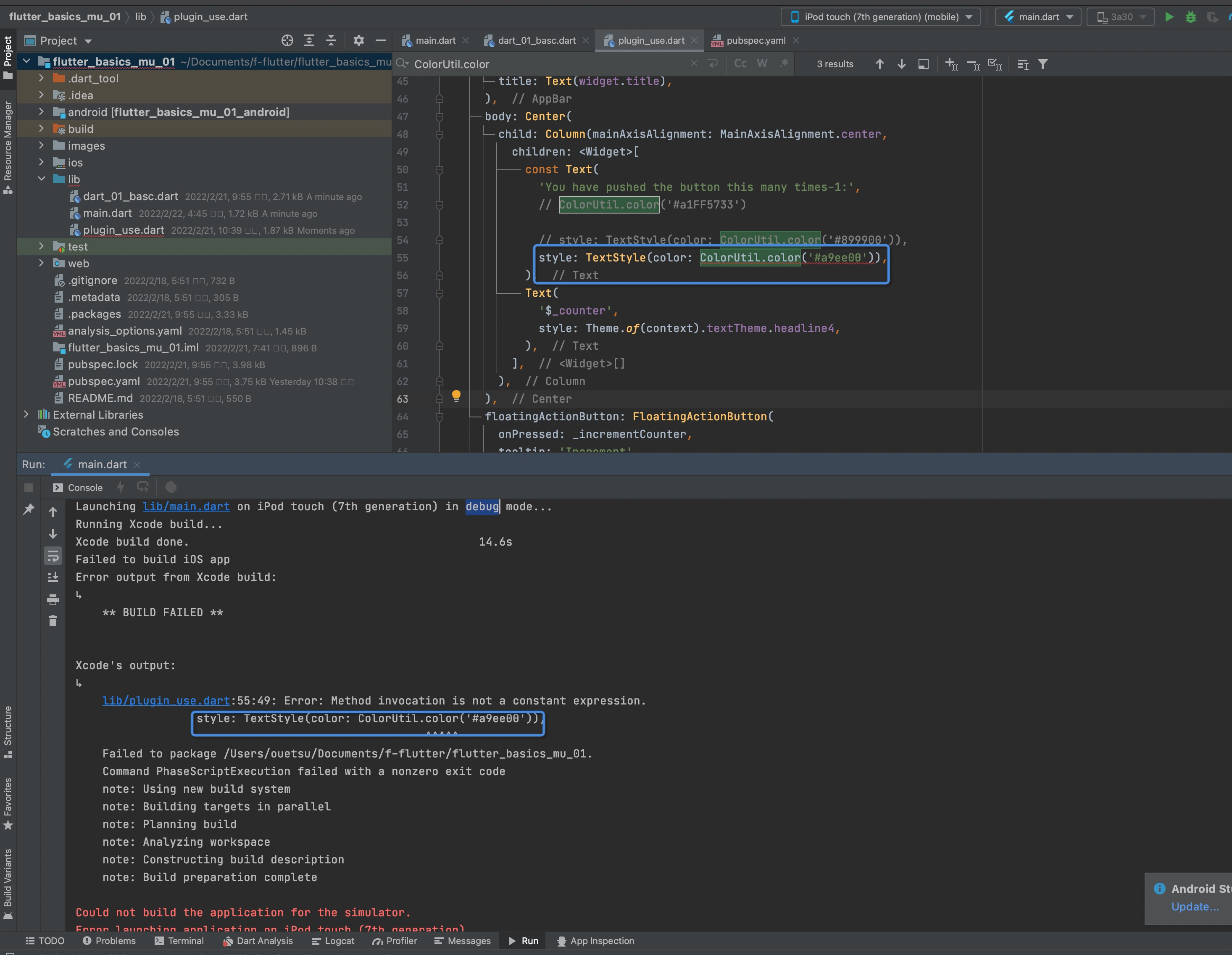
希望老师能够说一下错误的 具体原因, 因为将老师源码中的代码复制粘贴到相应的文件之后是没有报错的, 但是这样不知道错误的具体原因以后遇到类似的问题自己还是没有办法解决, 谢谢。
2132
收起
正在回答
2回答

相似问题
老师您好,我的项目突然出错,tomcat启动后报很多错误,之前都好好的
1499
0
9


疯狂报错Vue.extend is not a function
6367
0
2




老师您好,执行webpack的时候报错
1335
1
5


请问执行应用报错这个是为什么
744
0
3



登录后可查看更多问答,登录/注册
Flutter从入门到进阶 实战携程网App 一网打尽核心技术
- 参与学习 4788 人
- 提交作业 164 份
- 解答问题 3277 个
解锁Flutter开发新姿势,,系统掌握Flutter开发核心技术。
了解课程