启动appium跑脚本报:error: Unhandled error: TypeError: undefined is not a function
报错详情信息:
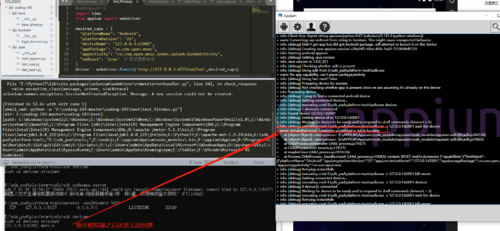
info: [debug] Retrying restartAdb
info: [debug] executing cmd: E:\sdk_pad\platform-tools\adb.exe -s 0123456789ABCDEF kill-server
info: [debug] Getting connected devices…
info: [debug] executing cmd: E:\sdk_pad\platform-tools\adb.exe -s 0123456789ABCDEF devices
info: [debug] 1 device(s) connected
info: [debug] Waiting for device to be ready and to respond to shell commands (timeout = 5)
info: [debug] executing cmd: E:\sdk_pad\platform-tools\adb.exe -s 0123456789ABCDEF wait-for-device
error: Unhandled error: TypeError: undefined is not a function
at [object Object]. (E:\APPIUM\Appium\node_modules\appium\node_modules\appium-adb\lib\adb.js:942:16)
at [object Object]. (E:\APPIUM\Appium\node_modules\appium\node_modules\appium-adb\lib\adb.js:180:9)
at ChildProcess.exithandler (child_process.js:742:7)
at ChildProcess.emit (events.js:110:17)
at maybeClose (child_process.js:1016:16)
at Process.ChildProcess._handle.onexit (child_process.js:1088:5) context: [POST /wd/hub/session {“capabilities”:{“firstMatch”:[{“platformName”:“Android”,“appium:platformVersion”:“23”,“appium:noReset”:“true”,“appium:deviceName”:“0123456789ABCDEF”,“appium:automationName”:“Appium”,"appium:appPackag]
代码:
#coding=utf-8
from appium import webdriver
class AppiumTest:
def init(self):
desired_caps = {‘platformName’: ‘Android’,
‘platformVersion’: ‘23’,
#“automationName”:“UiAutomator2”,
“noReset”:“true”,
‘deviceName’: ‘0123456789ABCDEF’, #0123456789ABCDEF
#‘app’:‘C:\Users\admin\Desktop\abc.apk’,
‘automationName’: ‘Appium’,
‘appPackage’: ‘com.lvshou.smartbearkit.debug’,
‘appActivity’: ‘com.lvshou.module.main.MainActivity’}
self.driver = webdriver.Remote(‘http://127.0.0.1:4723/wd/hub’, desired_caps)
self.driver.implicitly_wait(10)
return driver
def test_drug_reminder(self):
self.driver.find_element_by_id(‘com.lvshou.smartbearkit.debug:id/btn_medicine_reminder’)
if name == ‘main’:
runapp = AppiumTest()