关于windows下使用qt+ffmpeg打开音频设备报错
我是在windows环境下使用qt+ffmpeg做实验,然后在打开音频设备的时候报这种错误:
[dshow @ 1457e340] Could not find audio only device with name [麦克风 (Conexant SmartAudio HD)] among source devices of type audio.
[dshow @ 1457e340] Searching for audio device within video devices for 麦克风 (Conexant SmartAudio HD)
[dshow @ 1457e340] Could not find audio only device with name [麦克风 (Conexant SmartAudio HD)] among source devices of type video.
我的设备名为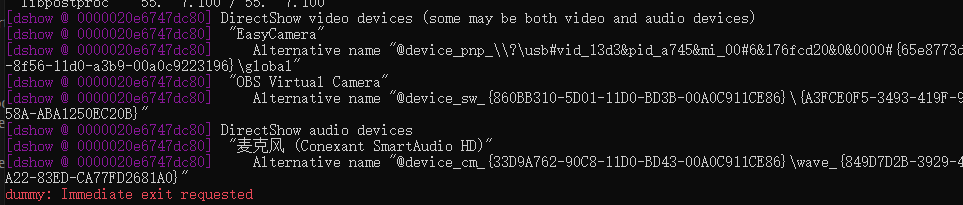
qt代码为:
//一.打开设备:1.注册设备,2.设置采集方式;3.打开音频设备
avdevice_register_all();//注册所有的设备
av_register_all();
AVFormatContext *ctx = avformat_alloc_context();
AVDictionary *option = NULL;
AVInputFormat *format = av_find_input_format("dshow");


char *deviceName = QString("audio=麦克风 (Conexant SmartAudio HD)").toLocal8Bit().data();//获取音频设备名称

int ret = avformat_open_input(&ctx,deviceName,format,&option);
if(ret == 0){
    qDebug()<<"打开设备成功";
}else if(ret < 0){
    qDebug()<<ret<<endl;
    char error[1024]={0,};
    av_strerror(ret,error,1024);//输出错误信息到error数组
    QString str = QString("Fail to open! %1").arg(error);
    qDebug()<<str;
}
4728
收起
正在回答 回答被采纳积分+3
1回答
相似问题
Windows下无法打开音频设备
786
0
2

windows环境下打开音频设备
1024
0
1
ffmpeg可以采集某个窗口或进程的音视频吗?
1516
0
4
代码中录制的音频,播放报Invalid data
1059
0
3
登录后可查看更多问答,登录/注册